Jimmy John’s Careers: How to Apply for a Job at Jimmy John’s Online (Step-by-Step Guide)
Many people searching for Jimmy John’s careers want to know how the application process works and what information they need before applying. If you’re interested in working at Jimmy John’s, the company provides an online application system where applicants can easily search for jobs and submit their applications.
But applying online can sometimes be confusing. To help you out, we have put together a complete, step-by-step guide to walking you through the entire Jimmy John’s job application process.
How to Apply for a Job at Jimmy Johns Step-by-Step Guide 2026
Step 1: Find the “Careers” Page
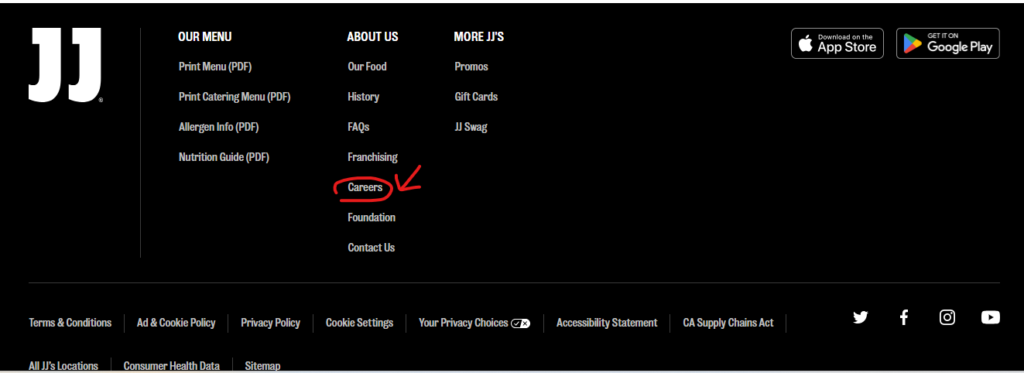
The first step is to visit the official Jimmy John’s Website. When you are on the homepage, don’t look for a “Jobs” button at the top—you won’t find it there.
Most companies, including Jimmy John’s, place their employment links at the very bottom of the page. Scroll all the way down to the Footer and click on the link that says “Careers.”
Step 2: Search for Openings Near You
Once you are on the Careers page, you will see a search box. Here, you can search by your Zip Code or Location to find jobs close to you.
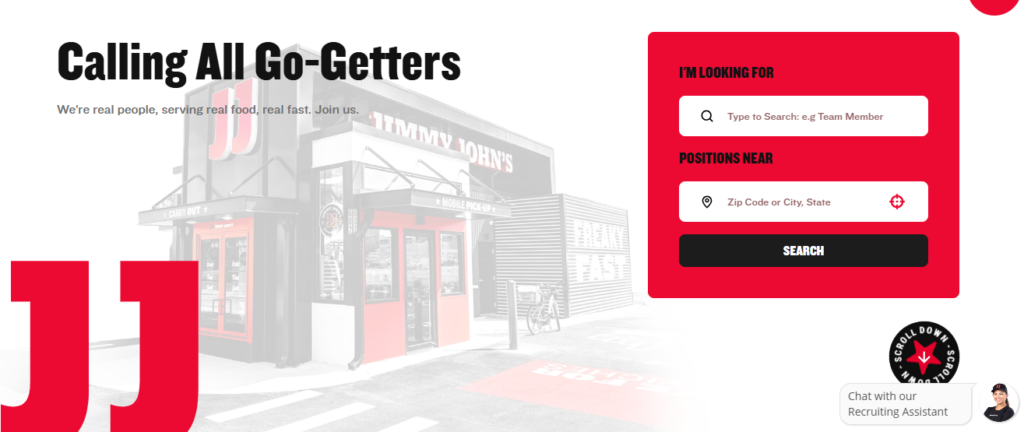
Alternatively, you can browse jobs by category. If you want to work inside the shop, you should look for categories like:
- Store Team Member
- In-Shop
- Shift Lead
Step 3: Select Your Location and Job Title
Let’s say you want to be a Store Team Member. The search results will show you all available team member jobs.
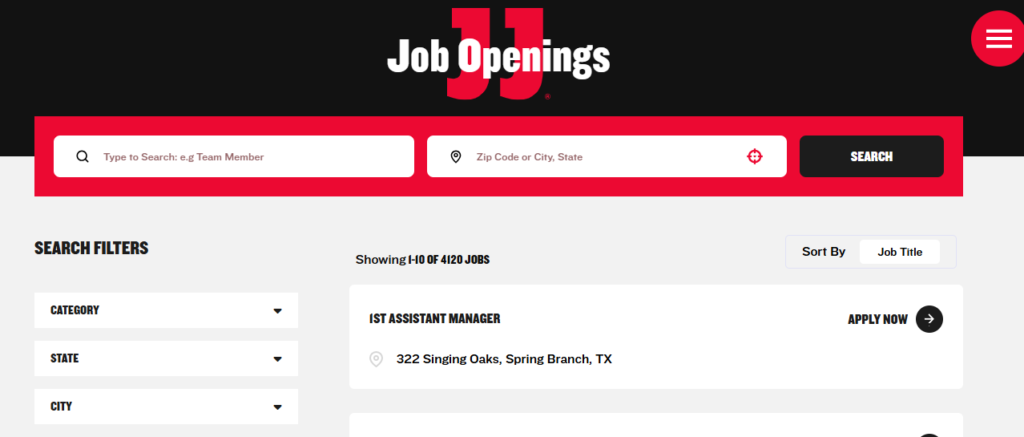
It is crucial to select the correct location. For example, if you are looking for jobs in Baton Rouge, Louisiana, make sure you select a store in that city and state, not one in Oregon!
Once you find a suitable location (e.g., Perkins Road), click on “Apply Now” to start the application.
Step 4: Create Your Application Account
Before you begin, you will need to set up a basic profile. You must fill out every field marked with a blue asterisk (*).
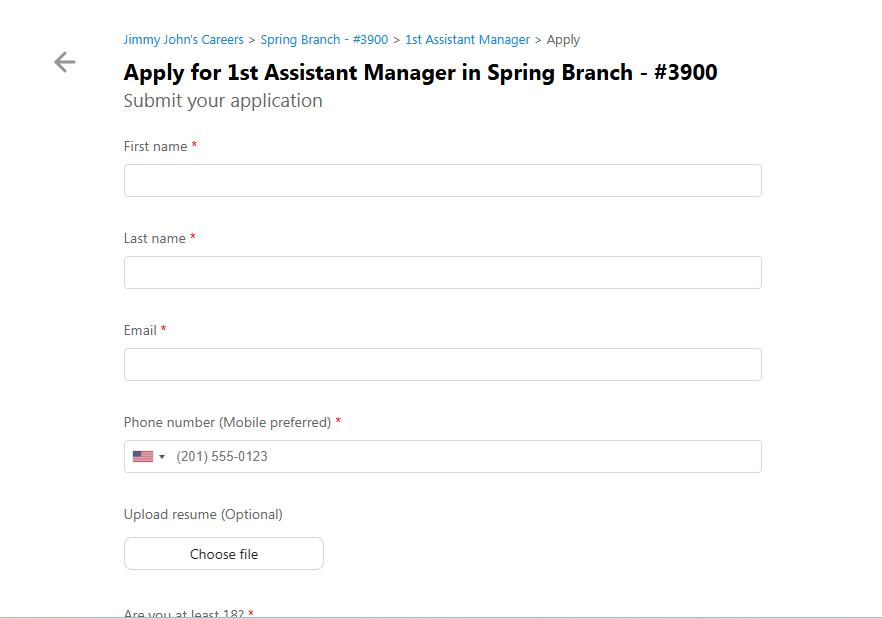
- Personal Information: Enter your Name and Date of Birth (e.g., Jane Public, July 4th).
- Create a PIN: This is a four-digit number that acts as your password. Do not forget this PIN! You will need it to log back in and check the status of your application.
Step 5: Review Disclosures and Sign Off
Next, you will be shown legal disclosures, including information about e-Verify and electronic signatures.
Important Tip: We highly recommend you open and read these documents before signing. While it takes a minute, you should always know exactly what you are consenting to. If you do not agree, you cannot proceed with the application.
Step 6: Enter Your Availability and Start Date
This section is crucial for employers. They need to know when you can work.
- Hours: Mention how many hours you want to work per week (e.g., 30 hours).
- Schedule: Indicate if you are available all week or only certain days. Be honest here.
- Start Date: Let them know the earliest you can begin working (e.g., May 15th).
Step 7: Provide Contact Information
Jimmy John’s needs to know how to reach you. Fill out:
- Address: Your full home address.
- Email: Use a professional email address (e.g., janepublic@gmail.com).
- Phone Number: The best number to reach you. You can also opt-in or out of receiving text messages.
Step 8: Add Your Employment History
While you technically have the choice to say “No” to adding employment history, we strongly recommend clicking “Yes.” Even if it’s a job at a competitor (like Subway), relevant experience is very valuable.
Enter the following:
- Previous Employer: Company name and job title (e.g., Sandwich Artist).
- Dates of Employment: When you started and when you left.
- Responsibilities: What did you do? (e.g., Made sandwiches, worked the register, cleaned the store).
- Reason for Leaving: (e.g., Location closed).
- Can they contact? It is usually best to say “Yes.”
Step 9: Answer Additional Background Questions
You will now answer a few quick general questions:
- Are you 18 or older?
- Have you ever worked at a Jimmy John’s before?
- Do you have any friends or family members currently working at Jimmy John’s?
- Have you ever been convicted of a crime?
You will also be asked to provide your Social Security Number at this stage to process your application.
Step 10: Sell Yourself (The “Good Fit” Question)
This is a required field, and it’s your chance to shine. Jimmy John’s will ask: “Why do you feel you’re a good fit for this position?”
Here are some points to include:
- Experience: Highlight any relevant customer service or food preparation experience.
- Passion: Mention that you love the product. If you are enthusiastic about the sandwiches, you will be better at selling them!
- Soft Skills: Emphasize that you work well in a team and enjoy working with the public.
Step 11: Review and Submit
Finally, you will see a summary of your application. Ensure all the information is correct and that you are applying to the correct position and location.
If everything looks good, hit “Submit Application.”
That’s it! The process is quick and easy. Now, you just need to keep an eye on your email or phone for a message from the hiring manager.
Good luck with your application, and we hope you get that “freaky fast” job!
How to Apply for a Job at Jimmy John’s: Watch Full Video
Tips for Applying to Jimmy John’s Careers
If you want to improve your chances of getting hired at Jimmy John’s, consider the following tips:
Provide accurate information
Always ensure your contact details and work history are correct.
Include relevant experience
Restaurant or customer service experience can be helpful.
Show enthusiasm for the job
Employers appreciate applicants who demonstrate genuine interest.
Check your messages regularly
Hiring managers may contact you quickly after reviewing applications.
FAQs About Jimmy John’s Careers
How do I apply for a job at Jimmy John’s?
You can apply online through the careers section of the official website of Jimmy John’s by searching for jobs and submitting an application.
What positions are available at Jimmy John’s?
Common job positions include:
- Store Team Member
- Delivery Driver
- Shift Leader
- Restaurant Manager
Do I need previous experience to work at Jimmy John’s?
Many entry-level positions do not require prior experience, but restaurant or customer service experience can improve your chances of being hired.
How long does the Jimmy John’s application process take?
The online application usually takes 10–20 minutes to complete, depending on how much work history you include.
What age does Jimmy John’s hire?
Most locations of Jimmy John’s typically hire workers starting at 16 or 18 years old, depending on the position and local labor laws.
Final Thoughts
Applying for Jimmy John’s careers is a straightforward process that usually takes only a few minutes to complete. By preparing your contact details, work history, and availability in advance, you can submit your application quickly and efficiently.
Whether you’re looking for your first job, a part-time position, or restaurant experience, Jimmy John’s offers a range of opportunities in locations across the United States.
For more helpful guides about the brand, you can also explore jimyjohnmenu.com, where we share:
- Updated Jimmy John’s menu with prices
- Sandwich guides and reviews
- Restaurant tips and information